

Nonconformities and corrective actions
What it is for: knowing which corrective actions are really closed, with evidence, and which were closed with nothing to show that they worked.
It is done on a register of the Nonconformity / CAPA type.
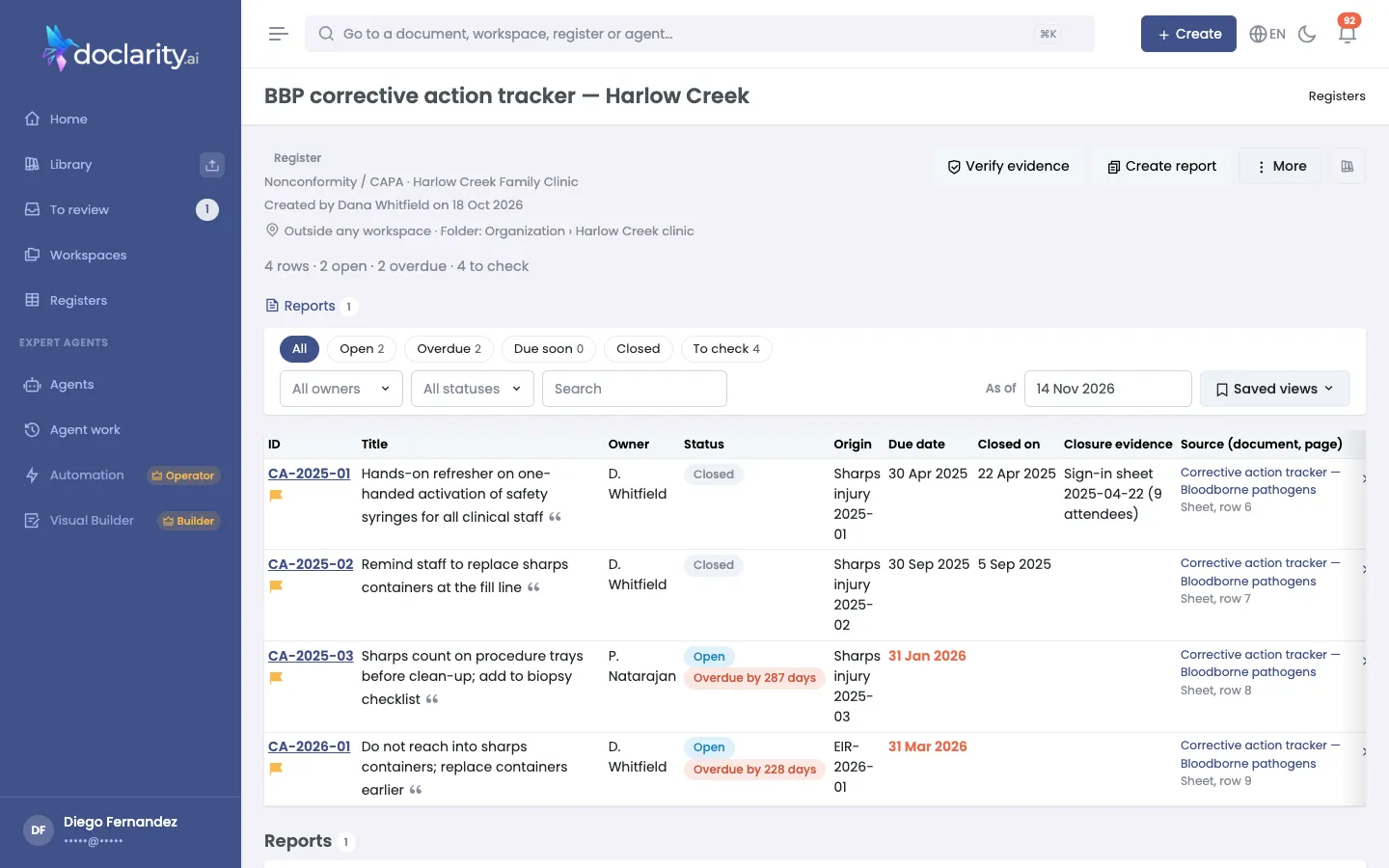
The columns
Section titled “The columns”- Statuses: Open, In progress, Done (effectiveness not recorded), Closed, Cancelled, Reopened.
- Closure evidence and Effectiveness check (Yes, effective, Yes, not effective, No, to be planned, Not stated).
Update from documents
Section titled “Update from documents”- Open the register › Update from documents.
- If you have one, add the export of your old tool (optional), then the forms and the closure evidence.
- Start the reading.
The summary gives the proofs checked, the rows closed with no proof found, those the documents contradict, and the proposed links to the event and audit finding registers. Everything arrives as proposals, to confirm.
Two flags come back often:
- “Recorded as closed, but no closure evidence is attached.”
- “Closed, but no effectiveness check shows the action worked.”
The report
Section titled “The report”Create report gives a dated document with the sections “Closed in the period”, “Closed without proof”, “Overdue” and “Came back”.
Reminders
Section titled “Reminders”An action with a due date sends a reminder 14 days before. See Notifications.